
What it is (and why it exists)
AI tools have quickly become part of everyday work. You have a document, you want an answer, so you paste it into ChatGPT or a similar tool. It’s convenient and it works.
But that isn’t always an option.
For some documents, uploading them anywhere just isn’t appropriate. It may not be clear where the data goes, how long it’s kept, or how it might be used later.
Private Document Chat is designed as a private, offline alternative to ChatGPT when uploading documents is not an option.
It’s a Windows desktop application that lets you ask questions about your own documents using AI that runs entirely on your computer. Everything happens locally. Your files stay where they are.
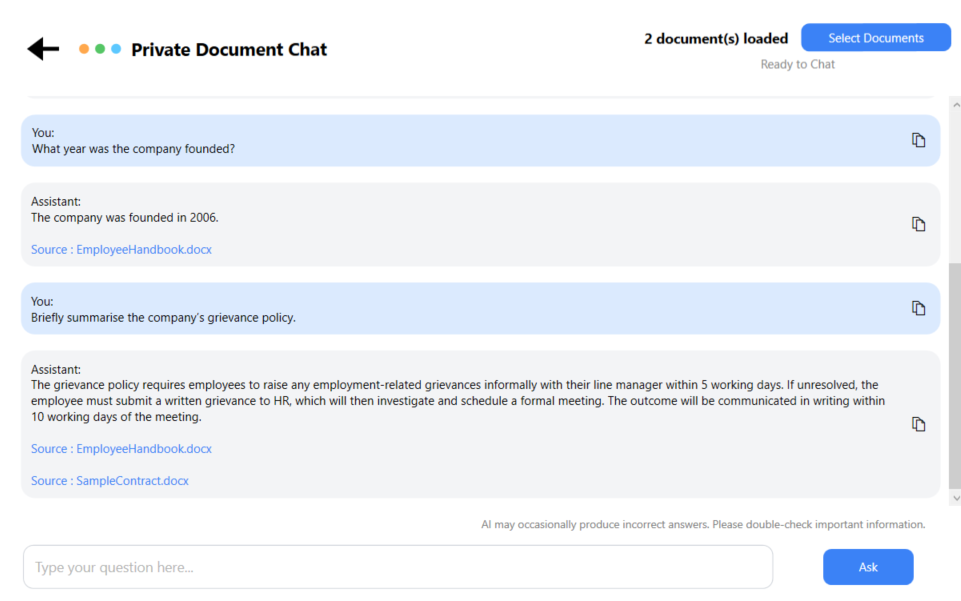
Chat with your documents
Privacy and trust
Private Document Chat is designed with privacy as a first-class requirement.
Documents are processed locally on your machine. No files are uploaded, no accounts are required, and the app does not rely on cloud services. There is no tracking or telemetry, and your documents are never edited or altered.
Answers are generated using only the content of your documents.
Private Document Chat also shows where answers come from. You can see which document was used, open the original file, and view the specific sections that support the answer. This makes it easier to verify and trust the output.

No cloud processing
All processing runs locally on your computer. Files are never uploaded.

No accounts or subscriptions
Buy once and use it. No sign-ups, recurring charges, or renewal traps.

No telemetry or data collection
The app does not track usage, behaviour, or analytics of any kind.

Fully offline capable
Works without an internet connection once installed.
What people use it for
Private Document Chat is useful anywhere documents are long, repetitive, or difficult to search manually.
Common uses include:
- Summarising policies, handbooks, and internal documents
- Answering questions from contracts and agreements
- Comparing requirements across multiple documents
- Reviewing questionnaires and compliance material
- Understanding incident reports or technical files
It’s especially helpful when you need answers from existing documents without copying content into external tools.

Chat with your documents
Ask natural-language questions across one or multiple documents and get clear, direct answers.

Source-linked answers with highlighting
Every response shows exactly where it came from, with highlighted references.
Unlimited usage
Use it as much as you like, with no caps, quotas, or usage limits.
Who it’s for
- Professionals working with confidential or sensitive documents
- Anyone who cannot upload files to ChatGPT or other cloud AI tools
- Teams in HR, legal, compliance, research, or engineering
Who it’s not for
- People looking for a general-purpose chatbot
- Use cases that require internet access or live data
Get Private Document Chat
Private Document Chat is available for Windows via the Microsoft Store.
It’s a one-time purchase priced at £19.99, with a 7-day free trial. There are no subscriptions and no usage limits.
It’s intended for professionals working with confidential documents, including HR, legal, compliance, research, and anyone who cannot upload files to cloud services.